If asked the question above, what would you say the answer is? Is it:
a) A lens with a focal length greater than 200mm?
b) A lens which can change it's focal length?
c) A lens whose physical length is less than the focal length?
I expect most of you will go for answer "A" but you'd be wrong. In real terms, anything with a focal length over 200mm is termed a telephoto lens in common parlance...but, there is a clue in the fact that you often find lenses shorter than 200mm refered to as telelphotos. So what are they talking about?
Well, the answer lies in techie talk.
According to the Canon Lens Work book, a telephoto lens is defined as follows:
With general photographic lenses, the overall length of a lens (the distance from the apex of the front lens element to the focal plane) is longer than its focal length. This is not usually the case with lenses of particularly long focal length, however, since using a normal lens construction would result in a very large unwieldy lens. To keep the size of such a lens manageable while still providing a long focal length, a concave (negative) lens assembly is placed behind the main convex (positive) lens which is shorter than its focal length. Lenses of this type are called telephoto lenses. In a telephoto lens, the second principal point is located in front of the frontmost lens element.
Translated into simple terms, a telephoto lens is one that has a physical length (from the front lens element to the the focal plane) which is less than its stated focal length.
-blabpictures-
Showing posts with label lens. Show all posts
Showing posts with label lens. Show all posts
30 May 2009
15 May 2009
Tilt and shift lenses - what does shift do?
Canon has the largest range of tilt and shift lenses of any digital SLR system with the TS-E 17mm f/4L, TS-E 24mm f/3.5L II, the TS-E 45mm f/2.8 and the TS-E 90mm f/2.8. The original TS-E 24mm f/3.5L is also still in the market even if it's not made by Canon anymore. What makes TS-E lenses special is the range of movements of the lens assembly relative to the focal plane. Unsurprisingly the Canon lenses offer tilt and shift movements as their name would suggest.
First why the designation TS-E? Other Canon lenses for EOS cameras are EF or EF-S, but these special tilt shift lenses are not auto focus lenses so the EF or Electro Focus designation doesn't fit.
Since the movement of the tilt and the shift have different effects on the images we'll cover each of the two kinds of image results in isolation to make it clear, though the combination of the two is most powerful. For this article we'll look at shift, and use the video modes of the latest EOS digital SLRs to make the effect totally understandable. Tilt will be covered in a future article.
In this video above the TS-E 45mm f/2.8 is fitted to our camera and the lens shifted parallel to the sensor all the way to the top limit of it's movement. Then in the first part of the video it's shifted down to the centre stop where a small indentation let's you know you've reached the centre of the movement, and in effect at this point the lens becomes a normal 45mm lens. Second part continues the movement of the lens from the centre to the lower limit. Watch how the trees in the video keep upright and how the video shows that the relatively small range of movements can change what is in the picture by so much. Use a hotshoe mounted spirit level to make sure the camera is level during the shoot to keep the trees upright. Sure you could try and frame the scene by tilting the camera, back to get the tops of the trees in, but then the trees will start to look smaller to the top and bigger to the bottom. This shift is like moving the camera up or down, and not just by a few millimetres.
TS-E lenses offer the ability to rotate the tilt and shift planes relative to the camera. This makes the seemingly impossible pictures possible. For example if you need to take a picture of a person who is stood in front of a mirror then you can shift the lens sideways and take the picture, the photographer will be simply out of the frame and importantly not showing in the mirror! Widely thought to be only useful for architecture, interiors and technical imagery the TS-E lenses offer amazing possibilities for creative photographers.
For more reading then check some of these links to the Scheimpflug principle,and an article on the TS-E 45mm lens on CPN. If you want to see the TS-E 24mm f/3.5L II 'dance' then check out the bottom of this preview article at dpreview.
-blabpictures-
First why the designation TS-E? Other Canon lenses for EOS cameras are EF or EF-S, but these special tilt shift lenses are not auto focus lenses so the EF or Electro Focus designation doesn't fit.
Since the movement of the tilt and the shift have different effects on the images we'll cover each of the two kinds of image results in isolation to make it clear, though the combination of the two is most powerful. For this article we'll look at shift, and use the video modes of the latest EOS digital SLRs to make the effect totally understandable. Tilt will be covered in a future article.
Shifting the lens on an EOS video capbable DSLR from Blab pictures on Vimeo.
In this video above the TS-E 45mm f/2.8 is fitted to our camera and the lens shifted parallel to the sensor all the way to the top limit of it's movement. Then in the first part of the video it's shifted down to the centre stop where a small indentation let's you know you've reached the centre of the movement, and in effect at this point the lens becomes a normal 45mm lens. Second part continues the movement of the lens from the centre to the lower limit. Watch how the trees in the video keep upright and how the video shows that the relatively small range of movements can change what is in the picture by so much. Use a hotshoe mounted spirit level to make sure the camera is level during the shoot to keep the trees upright. Sure you could try and frame the scene by tilting the camera, back to get the tops of the trees in, but then the trees will start to look smaller to the top and bigger to the bottom. This shift is like moving the camera up or down, and not just by a few millimetres.
TS-E lenses offer the ability to rotate the tilt and shift planes relative to the camera. This makes the seemingly impossible pictures possible. For example if you need to take a picture of a person who is stood in front of a mirror then you can shift the lens sideways and take the picture, the photographer will be simply out of the frame and importantly not showing in the mirror! Widely thought to be only useful for architecture, interiors and technical imagery the TS-E lenses offer amazing possibilities for creative photographers.
For more reading then check some of these links to the Scheimpflug principle,and an article on the TS-E 45mm lens on CPN. If you want to see the TS-E 24mm f/3.5L II 'dance' then check out the bottom of this preview article at dpreview.
-blabpictures-
9 May 2009
Focus distance limit switches on lenses
Some of the Canon lenses feature a little slide switch to let you restrict the range of focus distances the lens will operate over, but why?
With the longer focal length lenses there's often quite narrow depth of field and also quite a large range of movement for the optics to cover from the closest focus distance out to infinity. If your subjects easily fall in to the range covered by a lens restricted limit switches then you get a much faster focus shift from minimum to maximum subject distance as the focus assembly only moves a small set of it's possible range. There are quite a lot of lenses in the range with focus limit switches including the EF100mm f/2.8 MACRO USM, EF135mm f/2L USM, EF70-200mm f/4L IS USM. In fact most L series lenses with focal lengths longer than 100mm have focus limit switches. In the case of a mega lens like the Ef800mm f/5.6L IS USM there's three positions for the limiter including the full 6 metre close focus to infinity range!
Coming back to something more normal the popular EF70-200mm f/4L IS USM has focus limit ranges 1.2m to infinity and 3m to infinity. So if you are shooting say motorsport and are over 3m from the track boundary choose the restricted range of focus, the lens will move from the new 3m minimum focus to infinity much faster than it would from 1.2m to infinity. This makes the AF seem more snappy when you pick up a camera and the initial focus is way off. There's just less time spent hunting for the subject while the lens racks in and out from minimum to maximum focus distances.
-blabpictures-
-blabpictures-
7 May 2009
IS Modes
I wrote about Image Stabiliser lenses with movies just the other week as well as shutter speed choices to avoid camera shake, so I thought I'd follow it up with some advice on the Image Stabiliser modes found on Canon lenses.
Most of the IS lenses in the Canon range feature two IS modes, cunningly named Mode 1 and Mode 2. These two modes cause the IS system to work differently so you can choose the mode depending on what sort of shot you're taking. The question is, when do you use each setting?
Mode 1 - General shooting. This is the mode you will have the camera set to most of the time. The IS mechanism will try and remove camera shake in both the horizontal and vertical direction, to give a sharp image.
Mode 2 - Panning. If you are shooting moving subjects, then one technique you might choose to use is a slow shutter speed and panning with the subject. If you get it right, this creates and image with a sharp subject and blurred background. It's a very effective technique and is used widely in motorsport photography especially. If you decide to have a go at panning, then you should set the IS Mode to 2. This locks the IS mechanism in one direction so say you are panning from left to right, the IS mechanism will not try to compensate for the horizontal motion, instead concentrating only on any vertical fluctuations.
-blabpictures-
Most of the IS lenses in the Canon range feature two IS modes, cunningly named Mode 1 and Mode 2. These two modes cause the IS system to work differently so you can choose the mode depending on what sort of shot you're taking. The question is, when do you use each setting?
Mode 1 - General shooting. This is the mode you will have the camera set to most of the time. The IS mechanism will try and remove camera shake in both the horizontal and vertical direction, to give a sharp image.
Mode 2 - Panning. If you are shooting moving subjects, then one technique you might choose to use is a slow shutter speed and panning with the subject. If you get it right, this creates and image with a sharp subject and blurred background. It's a very effective technique and is used widely in motorsport photography especially. If you decide to have a go at panning, then you should set the IS Mode to 2. This locks the IS mechanism in one direction so say you are panning from left to right, the IS mechanism will not try to compensate for the horizontal motion, instead concentrating only on any vertical fluctuations.
-blabpictures-
5 May 2009
A star in the range - EF100mm f/2.8 Macro USM
The second part of our 'star in the range' series sees us looking at the EF 100mm f/2.8 Macro USM lens. Those of you with this lens will know how good it is, those without can only wonder what all the fuss is about. The truth is, this lens really is quite remarkable. It offers full 1:1 (lifesize) reproduction without having to change the length of the lens when focusing, and the results are stunningly sharp. So sharp in fact, that a common question asked is "Why is it not an L-Series lens?" The answer is that it doesn't use some of the technology required to make it an L-Series model, however the optical performance is more than enough to justify it.
If there are any complaints leveled at this lens, it's that it is in fact too sharp in some situations. Portraits usually. This lens seems to resolve detail that you just don't see, meaning that in a portrait shoot (for which the 100mm focal length is actually very useful) you end up with lots of images that need retouching to remove skin blemishes you didn't know where there!
So, should you buy it? Well, if you want to get into macro photography, it is the obvious choice in the range. The MP-E 65mm f/2.8 1-5x Macro photo is too specialised and lacks the ability to focus at infinity, the EF50mm f/2.5 Macro only does shalf life size unles you add the life size adaptor and the EF180mm f/3.5L Macro USM is more designed for subjects that need a longer working distance - butterflies and dragonflies for example. The 100mm is the all-rounder. You can shoot insects with it as long as you're careful about what you're doing, you can get in close to flowers and fungi and you can use it for portraits and general photography.
Is there anything missing from this lens? Well, I wish they'd box it with a lens hood included and I'd like to have this lens with an image stabiliser fitted like the N!kon VR Macro lens. Other than that though, it's a stunning lens that anyone interested in macro photography should seriously consider.
Have you got one? If so, what are your thoughts on it? Would you buy it again if you had to?
-blabpictures-

If there are any complaints leveled at this lens, it's that it is in fact too sharp in some situations. Portraits usually. This lens seems to resolve detail that you just don't see, meaning that in a portrait shoot (for which the 100mm focal length is actually very useful) you end up with lots of images that need retouching to remove skin blemishes you didn't know where there!
So, should you buy it? Well, if you want to get into macro photography, it is the obvious choice in the range. The MP-E 65mm f/2.8 1-5x Macro photo is too specialised and lacks the ability to focus at infinity, the EF50mm f/2.5 Macro only does shalf life size unles you add the life size adaptor and the EF180mm f/3.5L Macro USM is more designed for subjects that need a longer working distance - butterflies and dragonflies for example. The 100mm is the all-rounder. You can shoot insects with it as long as you're careful about what you're doing, you can get in close to flowers and fungi and you can use it for portraits and general photography.
Is there anything missing from this lens? Well, I wish they'd box it with a lens hood included and I'd like to have this lens with an image stabiliser fitted like the N!kon VR Macro lens. Other than that though, it's a stunning lens that anyone interested in macro photography should seriously consider.
Have you got one? If so, what are your thoughts on it? Would you buy it again if you had to?
-blabpictures-
28 April 2009
A star in the range - EF 70-200mm f/4L IS USM

What, no Tuesday 'tog? Yes, it it is Tuesday, no, you're calendar is not wrong and no, there is no Tuesday 'tog today. Don't worry, there'll be one next week, we just thought we'd give it a break for a week while we take stock of where the blog is going and what it's going to do.
So this week, this is the start of a new mini-series picking out some of our favourite lenses in the Canon range. Some may be familiar to you, some maybe not, but all of them are lenses we've used and found to be cracking. First up this week is the EF 70-200mm f/4L IS USM lens. Now this lens is a great favourite of ours and is in fact well like by many photographers. Sadly though, it is often overlooked in favour of the EF 70-200mm f/2.8L IS USM in the belief that that f/2.8 lens is better.
Well, for all those that bought f/2.8 lenses - sorry! The f/4 lens is actually as good or better than the f/2.8 lens at any aperture. It's a much newer optical design and hence improvements have been made.
When looking at lenses, there are four things you're likely to consider:
Optics
Image Stabiliser
Weight
Price
If we take the optics first, as we said above the EF 70-200mm f/4L IS USM more than holds its own.
Image Stabiliser: f/2.8 = 3 stops, f/4 = 4 stops
Weight: f/2.8 = 1470g, f/4 = 760g
Price: f/2.8 = c.£1550, f/4 = c.£980
To make it simpler, you get better hand-holding ability, a weight saving of 710g (that's nearly half the weight) and a cost saving of about £570. Pretty clear cut isn't it?!
So, with the optic quality being equal and everything else being better on the EF 70-200mm f/4L IS USM lens, you may wonder why people still buy the f/2.8 lens. Well, the answer is simple - they shoot in low light or they use extenders. With extenders of in low light conditions, the f/2.8 lens is still king becasue it focuses better and keeps a larger maximum aperture. If you fit a 1.4x Extender the max perture drops by 1 stop taking the f/2.8 lens to f/4 and the f/4 lens to f/5.6 In bright light, this doesn't make too much difference, but once the light levels drop, having an aperture a stop wider can help with focusing.... not exposure though. Let's be clear on this = most people still have the film or early digital mindset. In other words "I can't take the ISO over 400 or I'll see noise". If you're shooting on one of the latest cameras, this doesn't matter. You can up the ISO further, still avoid undue image noise, and effectively counter the exposure loss of one stop.
For all those that do have the EF 70-200mm f/2.8L IS USM lens and are thinking you'd be better off with the f/4L IS version - don't worry. If your lens is in good condition, you should be able to sell it second-hand for more than the cost of a new f/4L IS lens. Just don't send any prospective purchaser to this page first!
-blabpictures-
25 April 2009
Lens hoods and filters
Hands up those that keep filters on the front of their lenses for protection.
Now, those with your hands in the air (it's ok, you can put them down now) do you use the best filters you can buy? You know, the Canon range or the Hoya Pro 1 Digital etc?
No? You use the ordinary ones from the corner shop?
Shame on you. Let me put it to you simply. A filter creates another air-glass interface and increases the risk of light scatter, reduced light transmission, flare, ghosting, aberrations etc. If you don't use the best filters you can buy, you may as well give up on the expensive glass habit you have and buy cheap milkbottle lenses for all the good you're getting out of your L-Series ones.
More to the point though, what protection is a filter on the front of the lens going to give? Honestly, if you drop it, two things will happen. The filter will break, thereby scratching the front element anyway, and the filter mount will deform leaving you with a broken filter jammed to the front of your lens. Great scenario!
In my opinion, there are only a couple of occasions when using a filter on the front of the lens is acceptable. 1. On a beach or dune with wind-blown sand. 2. In a rain storm with driving rain. 3. When the lens is pointing out of a fast moving vehicle in the direction of travel.
Notice anything about these scenarios? They all involve the possibility of wind-borne objects hitting the front lens element. At all other times, your better off without.
If you really want to protect the front lens element, get a lens hood. Lens hoods should be bought with lenses as standard. In fact, we wish Canon would start bundling them with all the lenses, not just the L-Series.
The lens hood, while not as effective against wind-borne objects, is effective against dropping the lens (it acts like a crumple zone), fingers getting the front of the lens accidentally, and most importantly, lens flare. Using a lens hood should be a matter of course. It will improve contrast in your images, reduce flare and ghosting and give you that piece of mind that for most situations, the front of your lens is well protected.
-blabpictures-
Now, those with your hands in the air (it's ok, you can put them down now) do you use the best filters you can buy? You know, the Canon range or the Hoya Pro 1 Digital etc?
No? You use the ordinary ones from the corner shop?
Shame on you. Let me put it to you simply. A filter creates another air-glass interface and increases the risk of light scatter, reduced light transmission, flare, ghosting, aberrations etc. If you don't use the best filters you can buy, you may as well give up on the expensive glass habit you have and buy cheap milkbottle lenses for all the good you're getting out of your L-Series ones.
More to the point though, what protection is a filter on the front of the lens going to give? Honestly, if you drop it, two things will happen. The filter will break, thereby scratching the front element anyway, and the filter mount will deform leaving you with a broken filter jammed to the front of your lens. Great scenario!
In my opinion, there are only a couple of occasions when using a filter on the front of the lens is acceptable. 1. On a beach or dune with wind-blown sand. 2. In a rain storm with driving rain. 3. When the lens is pointing out of a fast moving vehicle in the direction of travel.
Notice anything about these scenarios? They all involve the possibility of wind-borne objects hitting the front lens element. At all other times, your better off without.
If you really want to protect the front lens element, get a lens hood. Lens hoods should be bought with lenses as standard. In fact, we wish Canon would start bundling them with all the lenses, not just the L-Series.
The lens hood, while not as effective against wind-borne objects, is effective against dropping the lens (it acts like a crumple zone), fingers getting the front of the lens accidentally, and most importantly, lens flare. Using a lens hood should be a matter of course. It will improve contrast in your images, reduce flare and ghosting and give you that piece of mind that for most situations, the front of your lens is well protected.
-blabpictures-
15 April 2009
Closer than the minimum focus distance
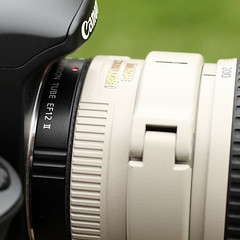 Do you ever hit the 'subject too close' limit with longer lenses? Wouldn't it be great if that 70-200mm lens with it's 1.2m closest focussing distance could be used even closer sometimes?
 The EF12 II and EF 25 II extension tubes move the closest focus point of your lens even closer. Macro photography with an EF 500mm f/4L IS USM anyone?
Extension tubes are tools that some photographers see as only for macro work, but you can use them with a lot of lenses not just macro ones. Moving the rear of a lens further away from the sensor means that it will focus the light from closer subject distances than it can do normally, the downside - you can't focus on infinity anymore.
Some years ago Canon used to show a video with wildlife photographer greg Basco shooting snakes in trees using an EF 300mm f/2.8L IS USM lens with an extension tube on the back allowing much closer focussing.
In the past I've found the extension tube a neat solution to the problem of shooting through glass at zoos. In some cases you need to have the lens right up against the glass to reduce the reflection, but then the subject is too close for the minimum focus on the lens. Put on the extension tube and the problem is solved.
These two shots were taken with an EF 70-200mm f/4L IS USM lens at it's minimum focus distance, the first with the lens only, the second with an EF 12 II extension tube fitted between lens and camera.


You can now focus at distances less than 1 metre from the subject but maximum subject distance becomes just less than 5 metres with the lens set to infinity.
When Canon introduced EF-S lenses with the EOS 300D it changed the extension tubes so that they could be used with EF-S lenses as well as EF lenses. This makes it possible to use an EF-S 18-55mm f/3.5-5.6 kit lens as a macro lens on an EOS-1Ds Mark III, but the subject distance is very short. Some wide-angle lenses aren't compatible with extension tubes as the point of focus moves to a point inside the lens itself.
For the technical or the inquisitive readers you can also combine extenders like EF 1.4x II or EF 2x II with extension tubes for even more magnification.
Extension tubes may make the automatic peripheral illumination correction available in DIGIC 4 cameras insufficient, and likely it will render flash distance information wrongly too.
-blabpictures-
18 February 2009
New products from Canon

Another day with two posts in quick succession!
And here they are. As usual, Canon have launched a veritable avalanche of new products today... but surprisingly no new digital SLR among them.

Both lenses also feature the SWC - Subwavelength structure coating - found on the EF24mm f/1.4L II USM lens released last year. This SWC helps minimise reflection, flare and ghosting off the lens element, working in the same way as the surface of a moth's eye does to reduce reflection.
-blabpictures-
Of interest to us, and probably you guys and girls too, are two new tilt-and-shift lenses: TS-E 17mm f/4L and TS-E 24mm f/3.5L II. The 24mm lens is an update to the current TS-E 24mm and the 17mm lens is all new - and is the widest angle TS-E lens available for 35mm SLR cameras - all you landscape and architectural photographers get your credit cards ready now.... a 17mm tilt-and-shift? Now that's cool. And it's another L-lens TS-E.
The TS-E 24mm lens looks interesting too - with ± 8.5° Tilt and ±12mm Shift it has the largest range of lens movements available for a tilt and shift lens on a 35mm camera. It looks like Canon may have increased the image circle size to allow this but we'll know more when more detailed specifications appear.
Both lenses also feature the SWC - Subwavelength structure coating - found on the EF24mm f/1.4L II USM lens released last year. This SWC helps minimise reflection, flare and ghosting off the lens element, working in the same way as the surface of a moth's eye does to reduce reflection.
Press release below:
United Kingdom / Republic of Ireland, 18 February, 2009: Canon today announces the launch of two new tilt and shift lenses, the TS-E24mm f/3.5L.
At 17mm, the TS-E 17mm f/4L has the widest view angle of any tilt and shift lens currently available; coupled with outstanding image quality across the whole frame, it is an ideal choice for architectural or landscape photography. Building on the success of its predecessor, the TS-E 24mm f/3.5L II, like the TS-E 17mm f/4L, now includes Canon’s sub-wavelength structure coating (SWC). Canon’s patented lens coating is specifically designed to minimise ghosting and flare caused by internal reflections to help deliver crisp, clear images.
Canon was the first company to offer 35mm camera users a combined tilt and shift lens, With 36 years experience in this field, Canon has now added a new unique functionality to the TS-E 17mm f/4L and TS-E 24mm f/3.5L II, allowing users to rotate the direction of the tilt and shift independently of each other. This affords greater control over the focal plane, replicating the movements of a large format view camera. Canon’s revolutionary tilt and shift revolving mechanism is particularly useful when shooting product shots from a perspective where specific framing and focal plane is required.
The new lenses, influenced by feedback from professional photographers, have been created to produce the best image quality with high resolution, high contrast and low distortion. The use of high-precision asphercial front elements keeps distortion, common in wide angle lenses, to an absolute minimum, even at the edges of the frame. The TS-E 17mm f/4L and TS-E 24mm f/3.5L II also feature multiple UD elements to reduce chromatic aberration and optimised focus mechanisms.
Canon today has also introduced a new range (52mm to 72mm) of versatile, multi-functional PL-C B polarizing filters to help reduce reflections from glass or water or darken blue skies. The PL-C B’s, which are now available in 52mm, 58mm, 67mm, 72mm, 77mm and 82mm filter thread sizes, also allows the lens cap to be attached to the lens to prevent damage to the filter if left attached when not in use.
Key features of the TS-E 17mm f/4L and TS-E 24mm f/3.5L II include:
Tilt and shift lenses compatible with all Canon EOS cameras Ultra Wide 17mm / wide 24mm focal length, ideal for architecture and landscapes High precision lens elements for low distortion and high resolution to the edge of the image ± 6.5° Tilt and ±12mm Shift (TS-E 17mm f/4L) ± 8.5° Tilt and ±12mm Shift (TS-E 24mm f/3.5L II)
Tilt and shift mechanism rotates +/-90° allowing shift in any direction
Tilt mechanism rotates +/-90° allowing tilt in any direction relative to the shift
Aspherical and UD lens elements minimise chromatic aberration Sub-wavelength structure and super-spectra coatings minimise ghosting and flare
At 17mm, the TS-E 17mm f/4L has the widest view angle of any tilt and shift lens currently available; coupled with outstanding image quality across the whole frame, it is an ideal choice for architectural or landscape photography. Building on the success of its predecessor, the TS-E 24mm f/3.5L II, like the TS-E 17mm f/4L, now includes Canon’s sub-wavelength structure coating (SWC). Canon’s patented lens coating is specifically designed to minimise ghosting and flare caused by internal reflections to help deliver crisp, clear images.
Canon was the first company to offer 35mm camera users a combined tilt and shift lens, With 36 years experience in this field, Canon has now added a new unique functionality to the TS-E 17mm f/4L and TS-E 24mm f/3.5L II, allowing users to rotate the direction of the tilt and shift independently of each other. This affords greater control over the focal plane, replicating the movements of a large format view camera. Canon’s revolutionary tilt and shift revolving mechanism is particularly useful when shooting product shots from a perspective where specific framing and focal plane is required.
The new lenses, influenced by feedback from professional photographers, have been created to produce the best image quality with high resolution, high contrast and low distortion. The use of high-precision asphercial front elements keeps distortion, common in wide angle lenses, to an absolute minimum, even at the edges of the frame. The TS-E 17mm f/4L and TS-E 24mm f/3.5L II also feature multiple UD elements to reduce chromatic aberration and optimised focus mechanisms.
Canon today has also introduced a new range (52mm to 72mm) of versatile, multi-functional PL-C B polarizing filters to help reduce reflections from glass or water or darken blue skies. The PL-C B’s, which are now available in 52mm, 58mm, 67mm, 72mm, 77mm and 82mm filter thread sizes, also allows the lens cap to be attached to the lens to prevent damage to the filter if left attached when not in use.
Key features of the TS-E 17mm f/4L and TS-E 24mm f/3.5L II include:
Tilt and shift lenses compatible with all Canon EOS cameras Ultra Wide 17mm / wide 24mm focal length, ideal for architecture and landscapes High precision lens elements for low distortion and high resolution to the edge of the image ± 6.5° Tilt and ±12mm Shift (TS-E 17mm f/4L) ± 8.5° Tilt and ±12mm Shift (TS-E 24mm f/3.5L II)
Tilt and shift mechanism rotates +/-90° allowing shift in any direction
Tilt mechanism rotates +/-90° allowing tilt in any direction relative to the shift
Aspherical and UD lens elements minimise chromatic aberration Sub-wavelength structure and super-spectra coatings minimise ghosting and flare
Circular aperture for creative, blurred highlights
TS-E 17mm f/4L has a floating internal focus mechanism delivers high image quality throughout focus range.
Pricing and Availability:
The TS-E 17mm f/4L is available from May 2009 priced at £2749.99 / €3049.99
RRP inc. VAT.
The TS-E 24mm f/3.5L II is available from May 2009 priced at £2399.99 /
€2659.99 RRP inc. VAT.
TS-E 17mm f/4L has a floating internal focus mechanism delivers high image quality throughout focus range.
Pricing and Availability:
The TS-E 17mm f/4L is available from May 2009 priced at £2749.99 / €3049.99
RRP inc. VAT.
The TS-E 24mm f/3.5L II is available from May 2009 priced at £2399.99 /
€2659.99 RRP inc. VAT.
PowerShot:  There is one other product that might be of interest as well (along with lots that are less likely to appeal to all of us in a professional capacity! ) Canon have announced their first waterproof digital camera, the PowerShot D10. It's waterproof to 10m, shockproof enough to withstand a drop from 1.22m onto a hard surface and freeze-proof to -10°C. It features a 12.1 Megapixel sensor, 3.0x optical zoom and DIGIC 4 processor for high image quality. I can't wait to get my paws on this and see how it performs - it could become the ultimate carry-anywhere camera for when your SLR camera is back at home....
There is one other product that might be of interest as well (along with lots that are less likely to appeal to all of us in a professional capacity! ) Canon have announced their first waterproof digital camera, the PowerShot D10. It's waterproof to 10m, shockproof enough to withstand a drop from 1.22m onto a hard surface and freeze-proof to -10°C. It features a 12.1 Megapixel sensor, 3.0x optical zoom and DIGIC 4 processor for high image quality. I can't wait to get my paws on this and see how it performs - it could become the ultimate carry-anywhere camera for when your SLR camera is back at home....Priced at £379.00 it'll be available at the end of April 2009.
-blabpictures-
5 February 2009
Canon E-TTL II flash: why you should use Canon lenses
Could your choice of lens can cause instability in the flash metering of your camera?
If you use Canon lenses they talk to your camera body providing all kinds of information to help the camera determine the correct shutter speed to reduce camera shake, the maximum and minimum aperture of the lens and also in many cases the distance to the subject. This communication is Canon's own protocol, and whilst third parties have re-engineered it with some success did they get all the information right?
So how does the lens affect the flash?
Canon's E-TTL II flash metering added the use of distance information to the calculation of the required flash output power where the lens provides distance info. Some older Canon lenses don't provide distance information so the algorithm has to work without this valuable information to retain compatibility. Consider what happens if some third party lenses appear to provide distance information, but actually don't provide it in the way Canon expects it. Could be as simple as Canon lenses tell the distance in meters, Sigma maybe in feet. So Canon lens says subject is 4 meters away, approximately 13 feet. Sigma may say 4 feet away or 1.2 meters! The camera just gets 4. You can guess how this info may make the flash exposure wrong. It could be worse though; what if the Sigma always said the lens was focussed at 4 meters. Sometimes it would be right, sometimes wrong giving inconsistent results. With under exposure, over exposure and correct exposure at different subject distances.
We've heard several times of the two Canon EOS users with the same flash, same camera and different lenses having random flash exposures on the non-Canon brand lenses. What's more swapping lenses moves the problem too.
With exclusively Canon lenses on hand this is a tough one to prove, but we welcome your feedback in the comments.
-blabpictures-
4 February 2009
Canon lenses that feature distance info
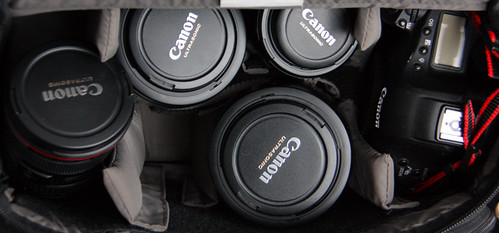
The Canon lenses below provide distance information to Canon cameras. According to Canon lens distance info is used by the Canon E-TTL II flash metering algorithm to help with exposure accuracy. The E-TTL II algorithm looks at the brightness of the scene without flash, the brightness of the scene with flash - to see which subjects are flash lit and which are not, and then uses lens distance information to help the calculation be more accurate. However if you use the bounce function on your Speedlite, wireless flash or a macro flash then distance information is not used. You can use a Speedlite with the off camera cord OC-E3 and still have the distance information used.
| Fixed focal length lenses | |
| EF 14mm f/2.8 L USM | EF 14mm f/2.8 II L |
| EF 20mm f/2.8 USM | EF 24mm f/1.4 L USM |
| EF 24mm f/1.4 L II USM | EF 28mm f/1.8 USM |
| EF 35mm f/1.4 L USM | EF 50mm f/1.2 L USM |
| MP-E 65mm f/2.8 1-5x | EF 85mm f/1.2L II USM |
| EF 85mm f/1.8 USM | EF 100mm f/2 USM |
| EF 100mm f/2.8 MACRO | EF 135mm f/2 L USM |
| EF 180mm f/3.5 L MACRO USM | EF 200mm f/2 L lS USM |
| EF 200mm f/2.8 L ll USM | EF 300mm f/2.8 L IS USM |
| EF 300mm f/4 L IS USM | EF 400mm f/2.8 L IS USM |
| EF 400mm f/4 DO IS USM | EF 400mm f/5.6 L USM |
| EF 500mm f/4 L IS USM | EF 600mm f/4 L IS USM |
| EF 800mm f/5.6 L IS USM | EF 1200mm f/5.6 USM |
| Zoom lenses | |
| EF 16-35mm f/2.8 L II USM | EF 16-35mm f/2.8 L USM |
| EF 17-40mm f/4L USM | EF 20-35mm f/3.5-4.5 USM |
| EF 24-70mm f/2.8L USM | EF 24-105mm f/4L IS USM |
| EF 24-85mm f/3.5-4.5 USM | EF 28-90mm f/4-5.6 llI |
| EF 28-105mm f/3.5-4.5 ll USM | EF 28-105mm f/4-5.6 |
| EF 28-105mm f/4-5.6 USM | EF 28-135mm f/3.5-5.6 IS USM |
| EF 28-200mm f/3.5-5.6 USM | EF 28-300mm f/3.5-5.6L IS USM |
| EF 70-200mm f/2.8 L IS USM | EF 70-200mm f/2.8 L USM |
| EF 70-200mm f/4 L USM | EF 70-200mm f/4 L IS USM |
| EF 90-300mm f/4.5-5.6 | EF 90-300mm f/4.5-5.6 USM |
| EF 100-300mm f/4.5-5.6 USM | EF 100-400mm f/4.5-5.6 IS USM |
| EF-S lenses | |
| EF-S 10-22mm f/3.5-4.5 USM | EF-S 17-55mm f/2.8 IS USM |
| EF-S 17-85mm f/4-5.6 IS USM | EF-S 18-55mm f/3.5-5.6 USM |
| EF-S 18-55mm f/3.5-5.6 II | EF-S 18-55mm f/3.5-5.6 IS |
| EF-S 18-200mm f/3.5-5.6 IS USM | EF-S 55-250mm f/4.5-5.6 IS |
| EF-S 60mm MACRO USM | |
If you are looking for lenses that work with Canon's Peripheral Illumination Correction function in the latest EOS cameras with DIGIC 4 processors then look here: http://blabpictures.blogspot.com/2008/11/lens-aberration-correction-compatible.html
-blabpictures-
14 January 2009
The lens you take...

I was talking to a friend the other day about lenses and we had a difference of opinion - until I explained myself more clearly. We were talking specifically about the EF85mm f/1.2L II lens. An absolute beauty of a lens and one which I owned for a while until I sold it and replaced it with an EF85mm f/1.8 USM. He was, to be honest, incredulous. He has and loves his f/1.2 lens and while he conceded that he also loves the 85mm f/1.8, he just couldn't see the rationale behind the apparent 'downgrade'.
So I explained.... I'd bought the 85mm f/1.2L II lens for a steal. It was a really great price, bought as part of a deal with another lens. I used it and loved it. But then came the day when I had to travel abroad. I started packing my bag. In went the camera body, in went the 35mm f/1.4L, in went the 135mm f/2L, I then picked up the 85mm f/1.2L, weighed it in my hand and put it back down again. While I loved the lens and it's results, I didn't love it enough to carry that weight around (for those that don't know the lens, it's a little over 1Kg).

If I shot weddings or lots of studio stuff, then there'd be no question. I'd have kept the lens. The fact is I do shoot those subjects now and again, but not enough to justify it. What I do do though is walk a lot with lots of camera kit. For me, the 600g saving is quite a lot and the optical quality between the two is not sufficient to warrant it. That and the faster focusing of the 85mm f/1.8 lens were the deciding factors for me.
Now my friend did make a couple of valid points - the f/1.2 lens gives you a look you just can't achieve with 1.8. It also has a different look even at f/1.8. It's not that it's better or worse, just different. And in low light, the extra stop can really save your bacon.
Now, if money was no object, well, I'd have both and just pick and choose as I needed to!
If you're wondering about the title of this post, it was our joint conclusion: The lens you take is better than the one you leave at home....
So, which would you choose and why? Tell us in the comments.....
8 December 2008
Canon cameras need f/5.6 or faster lenses
If you have a Canon EOS digital SLR camera that's not an EOS-1D or EOS-1Ds model you really should make sure your lenses have a maximum aperture of f/5.6 or faster. Canon doesn't write this in big enough letters in their specifications and instruction books but for the AF to work as Canon intended it needs a certain amount of light, the amount being the same amount as you get through a lens with an f/5.6 or faster aperture.
I've heard a number of photographers in camera clubs saying that they have focus trouble with their Canon cameras and their third party lenses. I also hear that it gets worse the more they zoom in with their lenses. The usual culprit is the Sigma or Tamron 18-200mm f/3.5-6.3 lens, though sometimes it's the Tamron 28-300mm f/3.5-6.3. The key being the f/6.3 aperture at the longer end of the zoom range. Last time I checked in a camera store the Sigma 18-200mm goes to f/6.3 around 120mm.
For a long time there's been no Canon 18-200mm solution but the new Canon EF-S 18-200mm f/3.5-5.6 IS USM is getting some nice comments [dpreview.com forums] [ Digital Pro Talk], and note that it's f/5.6 at the long end so your EOS will do it's best to AF properly, and we're not just talking in low light but in all kinds of light.
Check the current line-up of Canon lenses there's not a single lens with a maximum aperture slower than f/5.6 - says something doesn't it.
EOS-1D guys don't worry your center AF point can focus at f/8 so if you want to put a 1.4x extender on the EF 800mm f/5.6L IS USM lens you can still get AF.
-blabpictures-
I've heard a number of photographers in camera clubs saying that they have focus trouble with their Canon cameras and their third party lenses. I also hear that it gets worse the more they zoom in with their lenses. The usual culprit is the Sigma or Tamron 18-200mm f/3.5-6.3 lens, though sometimes it's the Tamron 28-300mm f/3.5-6.3. The key being the f/6.3 aperture at the longer end of the zoom range. Last time I checked in a camera store the Sigma 18-200mm goes to f/6.3 around 120mm.
For a long time there's been no Canon 18-200mm solution but the new Canon EF-S 18-200mm f/3.5-5.6 IS USM is getting some nice comments [dpreview.com forums] [ Digital Pro Talk], and note that it's f/5.6 at the long end so your EOS will do it's best to AF properly, and we're not just talking in low light but in all kinds of light.
Check the current line-up of Canon lenses there's not a single lens with a maximum aperture slower than f/5.6 - says something doesn't it.
EOS-1D guys don't worry your center AF point can focus at f/8 so if you want to put a 1.4x extender on the EF 800mm f/5.6L IS USM lens you can still get AF.
-blabpictures-
1 November 2008
Lens aberration correction - compatible lenses
Canon added lens correction functions to Digital Photo Professional in version 3. In essence the software engineers got access to the lens designers manual for each lens. In the lens manual there's the full design specification and the known optical characteristics. The software guys thought that they could improve some lenses performance with some software processing, but having the original lens designers book they could implement one of the best corrections possible; so they did. The result is some kind of special since it actually works really well, and driven by their success the software guys were out drinking with the camera firmware team and challenged them to implement vignetting correction in the DIGIC 4 processor - and so since they had some spare time and some resource in DIGIC 4 to exploit they built peripheral illumination correction in the EOS 50D and subsequent models. However the correction in camera can be thought of as a helper rather than the full solution. In camera the correction for vignetting is 50% of what DPP can do. Also DPP with RAW images can do distortion - pin cushion & barrel, chromatic aberration and colour blur corrections. Suddenly those old lenses on ebay got a bit more useful.
Here's the current list of compatible cameras and lenses with the Digital Photo Professional software. This is going to be kept live so you may want to come back sometime in the future when new models of camera and lens come out.
You can perform lens correction with the following cameras
-blabpictures-
Here's the current list of compatible cameras and lenses with the Digital Photo Professional software. This is going to be kept live so you may want to come back sometime in the future when new models of camera and lens come out.
You can perform lens correction with the following cameras
| EOS-1Ds Mark III | EOS-1D Mark III | EOS-1D Mark II N |
| EOS-1Ds Mark II | EOS-1D Mark II | EOS-1Ds |
| EOS-1D | EOS 5D Mark II | EOS 5D *1 |
| EOS 50D | EOS 40D | EOS 30D *2 |
| EOS 450D EOS Digital Rebel XSi | EOS 400D EOS Digital Rebel XTi | EOS 1000D EOS Digital Rebel XS |
*1 - Requires firmware version 1.1.1 or higher for maximum lens compatibility
*2 - Requires firmware version 1.0.6 or higher for maximum lens compatibility
| Ultra wide and wide-angle lenses | |
|---|---|
| EF14mm f/2.8L USM | EF 14mm f/2.8L II USM |
| EF 20mm f/2.8 USM | EF 24mm f/1.4L USM |
| EF 24mm f/1.4L II USM | EF 24mm f/2.8 |
| EF 28mm f/1.8 USM | EF 28mm f/2.8 |
| EF 35mm f/1.4L USM | EF 35mm f/2 |
| Standard and medium telephoto lenses | |
|---|---|
| EF 50mm f/1.2L USM | EF 50mm f/1.4 USM |
| EF 50mm f/1.8 | EF 50mm f/1.8 II |
| EF 85mm f/1.2L USM | EF 85mm f/1.2L II USM |
| EF 85mm f/1.8 USM | EF 100mm f/2 |
| Telephoto lenses | |
|---|---|
| EF 135mm f/2L USM | EF 135mm f/2.8 (with soft focus mechanism) |
| EF 200mm f/2L IS USM | EF 200mm f/2.8L USM |
| EF 200mm f/2.8L II USM | EF 300mm f/2.8L IS USM |
| EF 300mm f/4L IS USM | EF 400mm f/2.8L IS USM |
| EF 400mm f/5.6L USM | EF 400mm f/4 DO IS USM |
| EF 500mm f/4L IS USM | EF 600mm f/4L IS USM |
| EF 800mm f/5.6L IS USM | |
| Macro lenses | |
|---|---|
| EF 100mm f/2.8 Macro USM | EF 180mm f/3.5L Macro USM |
| Zoom lenses | |
|---|---|
| EF 16-35mm f/2.8L USM | EF 16-35mm f/2.L II USM |
| EF 17-35mm f/2.8L USM | EF 17-40mm f/4L USM |
| EF 20-35mm f/3.5-4.5 USM | EF 24-70mm f/2.8L USM |
| EF 24-85mm f/3.5-4.5 USM | EF 24-105mm f/4L IS USM |
| EF 28-70mm f/2.8L USM | EF 28-90mm f/4-5.6 USM |
| EF 28-90mm f/4-5.6 II USM | EF 28-90mm f/4-5.6 |
| EF 28-90mm f/4-5.6 II | EF 28-90mm f.4-5.6 III |
| EF 28-105mm f/3.5-4.5 USM | EF 28-105mm f/3.5-4.5 II USM |
| EF 28-105mm f/4-5.6 USM | EF 28-105mm f/4-5.6 |
| EF 28-135mm f/3.5-5.6 IS USM | EF 28-200mm f/3.5-5.6 |
| EF 28-200mm f/3.5-5.6 USM | EF 28-300mm f/3.5-5.6L IS USM |
| EF 55-200 f/4-5.6 II USM | EF 55-200mm f/4-5.6 USM |
| EF 70-200mm f/2.8L USM | EF 70-200mm f/4L USM |
| EF 70-200mm f/2.8L IS USM | EF 70-200mm f/4L IS USM |
| EF 70-300mm f/4-5.6 IS USM | EF 70-300mm f/4.5-5.6 DO IS USM |
| EF 75-300mm f/4.5-5.6 II | EF 75-300mm f/4-5.6 III |
| EF 75-300mm f/4-5.6 USM | EF 75-300mm f/4-5.6 II USM |
| EF 75-300mm f/4-5.6 III USM | EF 90-300mm f/4.5-5.6 |
| EF 90-300mm f/4.5-5.6 USM | EF 100-300mm f/4.5-5.6 USM |
| EF 100-400mm f/4.5-5.6L IS USM | |
| EF-S lenses | |
|---|---|
| EF-S 60mm f/2.8 Macro USM | EF-S 10-22mm f/3.5-5.6 USM |
| EF-S 17-55mm f/2.8 IS USM | EF-S 17-85mm f/4-5.6 IS USM |
| EF-S 18-55mm f/3.5-5.6 | EF-S 18-55mm f/3.5-5.6 II |
| EF-S 18-55mm f/3.5-5.6 USM | EF-S 18-55mm f/3.5-5.6 II USM |
| EF-S 18-55mm f/3.5-5.6 IS | EF-S 18-200mm f/3.5-5.6 IS USM |
| EF-S 55-250mm f/4-5.6 IS | |
-blabpictures-


Subscribe to:
Posts (Atom)


