Showing posts with label viewfinder. Show all posts

28 February 2009

Focussing screens - more than standard

All the EOS cameras feature a ground glass focussing screen. It's the translucent surface you see when you look through the viewfinder. We've explained before the importance of correctly setting the dioptre correction so that the screen is correctly viewed by the photographer. An increasing number of the EOS cameras allow you to change the focussing screen and it's something worth doing if your style of photography suits something more than standard.

Standard
The standard focussing screen fitted to your EOS is designed to give a bright clear image in a wide range of conditions and with a wide range of lenses. The maximum aperture of a lens determines how bright the screen can be, with lenses that have f/5.6 apertures giving a darker - harder to see - screen than lenses with faster apertures like f/1.4. The standard focussing screen has a special ground glass surface that effectively amplifies the light so even the slower f/5.6 lenses give a reasonably bright viewfinder.

Grid screen 
The first alternative screen is the grid screen, this one has a set of fine lines etched on it's surface making a grid pattern. These lines can help you with composition and also to keep horizons level and stop you composing with buildings falling over. In some cases they are used for technical purposes too. Brightness and viewfinder performance wise these screens are based on the standard ones so work well with all lenses.

Super precision matte - 'manual focus' screen
The first of the specialist screens is the super precision matte screen, sometimes called the 'manual focus' screen. This one has a different ground surface and as a result shows an almost real view of the actual depth of field that a lens and aperture combination will produce. The standard screen tends to show images with too much depth of field. The downside of this screen is that it gets darker quite a lot faster so Canon recommends it for f/2.8 aperture or faster lenses - exactly the ones you may be doing critical manual focus with.

Changing the focussing screen is quite simple, you remove the lens and release a small catch in the top of the mirror box, the screen drops down and using the tool supplied with each accessory focussing screen you lift out the existing one and replace with the alternates. Don't ever touch or try to clean the surface of the focussing screen, you'll end up buying a new one, but at around twenty to thirty pounds they are not expensive. When you change the focussing screen you need to set the appropriate custom function in the camera, this tells the exposure metering about the characteristics of the screen in use and tailors the metering system appropriately.

All EOS-1D models can have the focussing screen changed, as can EOS 5D, EOS 5D Mark II and also EOS 40D and EOS 50D. Some third parties provide screens and instructions for other models though you may invalidate your warranty if you fit them yourself.

Generally Ec-'X' screens are for EOS-1D models, Ed-'X' for EOS 5D, Ef-'X' for EOS 40D / EOS 50D and Eg-'X' for EOS 5D Mark II.

'X' indicates the type of screen, D = grid screen, S = super precision matte, A = standard screen.

In the case of the EOS-1D models there's a much more extensive range of focussing screens available including microprism and split image screens.


EOS 40D/ 50DEOS 5D Mark II


-blabpictures-

26 December 2008

Getting the correct exposure when using a remote release cable

It's another one of these what is that bit for kind of articles. EOS cameras can all be triggered using cable releases or in some cases infra-red remote releases. Usually this is done when the camera is on a tripod or located in a difficult to reach location. This odd location can cause problems since the light from the environment can enter the viewfinder from the rear - where you would normally be looking - and this can cause the exposure meter to meter erroneously. To prevent this kind of error you need to use something to block the light entering the viewfinder.

Eyepeice cover to prevent incorrect exposures when using a cableCanon has two solutions, the EOS-1D series solution with an eyepiece blind, and the other method of a piece of rubber on the camera neck strap. Since yesterday looked at EOS-1D models then today it's EOS 450D's turn. Though this also applies to the EOS 1000D, 40D, 50D and 5D Mark II. 

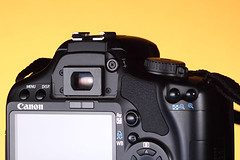
First up you need to remove the eyepiece rubber frame so that your camera looks similar to this one. 

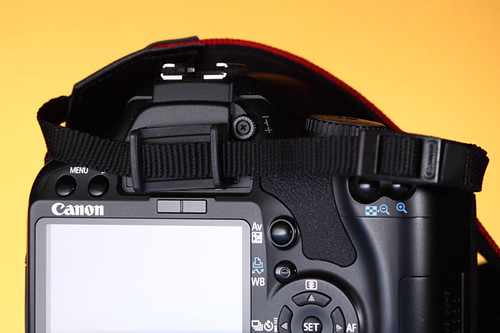
The next part is to locate the rubber cover on the strap, it's always now that you realise you left that bit on the standard strap when you replaced it with an Optec one!
Eyepeice cover to prevent incorrect exposures when using a cable
Here the cover is fitted over the eyepiece and will block stray light entering the viewfinder and messing up the exposure.


-blabpictures-

24 December 2008

Stop the blurred pictures when manual focussing

You've bought a great new EOS camera, and it's got a great autofocus system, though sometimes you just need to focus manually. With the advent of Digital EOS the viewfinders of the cameras were shrunk since the sensors and mirrors also were downsized. This can make it harder to see the correct focus point when you have taken the plunge and 'gone on manual'.

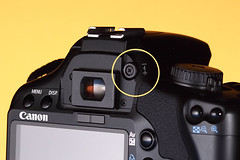
EOS dioptre correctionIf you pictures look blurred in the viewfinder normally, but the camera seems to focus fine then most likely the viewfinder is not set correctly for your eyesight. You need to adjust the viewfinder dioptre correction. It's a bit like the camera needs to be tailored for you, just like glasses or contact lenses are optimised for you. you can find the dioptre correction knob next to the viewfinder. Normally the cameras have a range of +1 to -3 dioptre but you can get additional correction lenses if you need a bigger or smaller correction.

EOS dioptre correctionOn most models the dioptre is easy to locate, but some models, EOS-1D series in particular, it's necessary to remove the eyecup to get at the adjustment. This tends to make it less likely that the adjustment gets changed by accident, and also follows that most pros use the same camera all the time. Your EOS 450D - pictured - may get passed from one family member to the next and need regular changes of dioptre setting.
The dioptre adjustment control is the one circled in yellow.

How do you adjust this viewfinder dioptre setting?
One of the most sensible ways is to remove the lens and simply look through the viewfinder, you are looking at the focussing screen that the images are seen on. If this focussing screen and the various marks, AF points etc look sharp to you then that is a good starting place. You may find it necessary ot point the camera at a brightly lit area or subject to judge this all critically. Once set you could even gaffer tape the control in place if you like - and some do!

It's Christmas eve and no amount of dipotre correction can fix alcohol base focussing - have a good one.

-blabpictures-