Showing posts with label EOS-1Ds Mark III. Show all posts

18 May 2009

Oil spots on the troubled EOS-1D(s) Mk III waters

Someone at Canon must be getting the message by now, the flagship EOS-1D(s) Mark III model has a new service alert for oil spots! It seems in the drive to make the camera better, stronger, faster they made it more oily too.

Here's the FAQ on the Canon UK service site, so you know the drill, it's time to send in the cameras again, because in the manufacturing stage they put too much oil on the camera moving bits and when the shutter is open some of that oil can land on the image sensor. Surely there can be little much left that has not been the subject of a fix or two by now, in fact we probably have a Mark III and a half already.

Update: both Mark III models are affected.
NOTE: The EOS-1Ds Mark III & EOS-1D Mark III are affected by the oil issue according the Canon sites.

-blabpictures-

3 March 2009

Breaking news.... EOS-1D/Ds Mark III AF updates

It's been rumbling along for a while, but as if to prove that Canon will continue developing products in response to user feedback, they have today quietly announced some updates to the EOS-1D and EOS-1Ds Mark III models. You'd expect that two years down the line a company would stop developing and just get on with whatever they're doing next, but Canon do seemingly feel the pain of their photographers, some of whom have been having issues with the cameras. 

I say they've announced them quietly, because they haven't seemingly told anyone about it yet. We just picked it up by chance looking through the support pages of the Canon UK website.

So, if you have an EOS-1D Mark III or EOS-1Ds Mark III, you want to read this.
There are two parts to it and you should read both as they will be of interest. 
First up is a heading entitled "Announcement regarding AF accuracy in EOS-1D Mark III and EOS-1Ds Mark III cameras". This talks about AF accuracy when any AF point other than the central point is used. Canon are offering free AF accuracy checks and alignment for affected products. To help further they have also produced a web page with some extra information on getting the very best out of the AF systems in the EOS-1D Mark III when shooting in AI Servo focus mode. This gives tips on setting the camera for different situations to ensure you get the very best performance possible. It also includes a section on Canon's AF performance philosophy so you can understand what they are aiming for. 

The second part is about abnormal mirror operation and Err99 on the EOS-1D Mark III and EOS-1Ds Mark III. Canon are offering free repair to any affected products and have also produced an updated firmware (1.2.5 for EOS-1D Mark III and 1.1.4 for EOS-1Ds Mark III) that gives more information when error codes appear so that better support can be given. 

More info on the firmware updates (applies to both models):

The following improvements have been incorporated.

1. Corrects a phenomenon associated with image display during Live View shooting. Corrects a phenomenon in which a displayed image becomes pitch-black if it is zoomed in during Live View shooting.
2. Improves reliability of USB communication. Corrects a phenomenon in which "busy" may continue to appear on the camera, if the USB cable is disconnected during USB communication.
3. Changes the error indications that are displayed on the camera. In previous firmware, if an error is detected "Err 99" is displayed on the camera in most cases.
Firmware Update Version 1.1.4/1.2.5 further specify the error indications as follows:

10 Malfunctions related to files have been detected.(*1)
20 Malfunctions related to the mechanical have been detected.
30 Malfunctions related to the shutter have been detected.
40 Malfunctions related to the power source have been detected.
50 Malfunctions related to the electric control have been detected.
70 Malfunctions related to images have been detected.
80 Malfunctions related to the electric control or images have been detected.
99 Malfunctions related to the mechanical charge mechanism have been detected.
*1: Err 10 is only displayed on the EOS-1Ds Mark III and other error numbers are shared.

If malfunctions in the camera are detected, "Err XX" will be displayed. A two-digit number that corresponds to the malfunctions detected by the camera will be displayed in the "XX" section of the error number. Other than the error numbers listed above, there are other numbers such as "01". In that case, provide appropriate handling and servicing by following the details displayed on the LCD monitor of the camera.
If an error code appears frequently, the camera is malfunctioning; therefore, note down the error number and contact our service center.
The changes in the display of error indications only apply to the EOS-1D Mark III and EOS-1Ds Mark III. The above error numbers and details do not apply to models other than the specified models.

Have you got one of these cameras? If so, let us know how it goes and what you think of the new information. 

-blabpictures-

16 February 2009

Highlight Tone Priority - ISO range limits

Have you tried Highlight Tone Priority? You know the one, the setting that shifts your dynamic range from the shadows to the highlights giving smoother tonal gradation in the highlight areas. While it's very useful in some situations - anywhere with lots of highlights and not much shadow - it can cause issues when you get to shadow areas as that dynamic range has to come from somewhere - the shadow tones. this could cause more noise in the shadow areas, so use it sparingly. 

Anyway, this post is not about that per se, but about the limitations it puts on your ISO range. We'll show you some examples of images with and without HTP in a future post. 

This list shows you the standard ISO range (with expansion turned on) of the camera and the ISO range once Highlight Tone Priority is turned on. 

EOS-1D Mark III - STD: 50-6400, HTP:ON 200-3200
EOS-1Ds Mark III - STD: 50-3200, HTP:ON 200-1600
EOS 5D Mark II - STD: 50-25,600, HTP:ON 200-6400
EOS 50D - STD: 100-12,600, HTP:ON 200-3200
EOS 40D - STD: 100-3200, HTP:ON 200-1600
EOS 450D - STD: 100-1600, HTP:ON 200-1600

For a quick way to check if you have HTP switched on or not, looked at the information screen - either the top LCD panel for those cameras that have one, or the rear LCD for the EOS 450D. 
On the EOS-1D/1Ds Mark III, EOS 40D and EOS 450D, the ISO speed when HTP is turned on, will show with small zeros eg: 2oo rather than 200. For the EOS 5D Mark II and EOS 50D, this has been changed so that it now shows D+ on the top LCD panel. 

-blabpictures-

25 December 2008

What is that, and what is it for?

EOS-1D / 1Ds Mark III secured USB connection
If you got one of these for Christmas, then you were a very good person in 2008. This little bit of plastic and metal screw can be found in the box with a new EOS-1D / EOS-1Ds Mark III camera. It's designed to hold in the USB cable when shooting tethered to a computer - often in a studio.

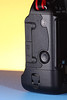
EOS-1D / 1Ds Mark III secured USB connection Side view of the EOS-1D / 1Ds Mark III

EOS-1D / 1Ds Mark III secured USB connection

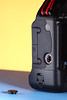
Side view with the cover removed. These covers are designed to cover all the pins that are used for communication and power with the WFT-E2 wifi transmitter, but often work loose over time.


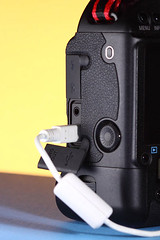
EOS-1D / 1Ds Mark III secured USB connection Here's the USB cable plugged in to the camera. Often this is used when shooting in the studio with the camera tethered to the computer. In this way images can be seen on screen right after they have been shot. Quite nice if you have to shoot with an art director peering over your shoulder, or if the make-up artist or stylist wants to make sure the image is perfect. You'll need to use EOS utility for this.

On the original EOS-1D and EOS-1Ds models a big 6-pin firewire 400 connector was fitted, and there were complaints when the EOS-1D Mark II was launched as it switched the big 6-pin to a small 4-pin connector. The result was cables falling out - a lot, and also the connectors themselves wearing out or breaking. Canon service centers can replace or repair them if your's is not working. With the EOS-1D Mark III the engineers realised that the placement of the screwed in to the magnesium body terminal cover for the WiFi unit was the ideal to use as a strong attachment point. So the little metal knurled screw and plastic bit in the box. At a Canon launch the Canon staff even showed the camera dangling from it's USB cable. I'd be more concerned for the strength of the USB cable!

EOS-1D / 1Ds Mark III secured USB connection
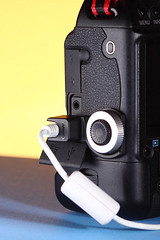
So finally we have the cable and it's retaining screw and plastic bit. It seems small, but this will likely protect your EOS-1D / 1Ds Mark III from broken USB ports if you tether it to the computer a lot. If you got an EOS-1Ds Mark III you should have two USB cables the standard one and a 5 metre one. The designers also made the knurled metal bit with a threaded hole in the top so you can avoid putting the plastic cap down and loosing it immediately.

Canon designers went one more step, they made the plastic also fit if you're using the WFT-E2 perhaps to give you extra or redundant storage on the camera.


Congratulations if Santa left you one of these cameras under your tree, share some thoughts or photos with us and you might be a Tuesday tog in 2009.

Happy Christmas from -blabpictures-