So, the new firmware for the EOS 5D Mark II will be arriving on the 2nd of June so we're told. What does it mean, and is it really a big step forwards for most users? To decide that, we need to look at what it's actually doing and why those features were not in the camera from the start.
The EOS 5D Mark II was the first EOS model to feature movie recording and the first camera from anyone to feature full HD recording. The market for this camera is huge. Possibly bigger than had been anticipated. It's also a very immature market in that there are no established users who have fixed ideas about what they're doing with the camera. The problem has come because the camera is simply so good at movie recording. If it had been a bit weak or not very good quality, the professional video guys would not have been interested and the standard full auto video mode would have been perfectly good enough for the people who were going to make use of the feature - those that have little or no experience with video and just want it to work without too much fuss.
That's the only reason I can see why Canon would have chosen to not give full manual control. If you think about it, giving the full control to a complete beginner with no experience is quite likely to lead to a bad user experience - it'll be too complex and the results won't be as good and they then won't use the feature.
Instead what's happened is that the camera was limited and the pro video guys got hold of it and wanted more - more control to get better results because they know what they're doing. They know what shutter speed and aperture will do to the results and how to use them creatively. I can already see there will be problems with the new firmware - beginner users will be confused and will end up shooting at (for example) faster shutter speeds than they need because they think they have to and it's what they're used to doing with still images of moving subjects. The reality is Canon could have simply given a few shutter speed choices - 1/30sec, 1/60sec, and then a break until the much higher speeds for specific results.
And what about sound? Ask any video guy and they'll tell you that sound is more important than pictures. The image can be great, but if the sound is rubbish, the whole thing will be poor. That's another reason for the simple video controls - it was a set and forget feature. You can start recording and let it get on with it without having to touch the camera and risk getting 'handling sounds' from the camera body. Granted the internal microphone is not great and for good sound you should be using an external unit, but for you complete beginners in video it does the job and allows you to get video with sound of little Johnny running around the park. Now you'll almost certainly have to buy an external microphone to get half decent sound because there will be more camera handling sounds going on as you adjust the aperture or ISO to get the right exposure. Suddenly the camera has gone from a product suitable for use by the masses to a one that is now capable of being used by everyone - amateur movie makers and pros alike but for almost everyone will require an external microphone.
So what am I complaining about? Well, it's this: If you've got full manual control and everyone is telling you it's a great thing, you'll be tempted to use it. If you don't know much about video, don't! By all means practice with it and find out how it works, but don't start shooting in manual movie mode and expect great results or you're setting yourself up for a fall.
For the pros reading this - you're happy you've got full manual control, but don't think it's all about you. In fact, you're not the biggest market for cameras. Think how many consumers buy cameras when compared to how many pros. And that's why Canon did what they did. They're probably over the moon you're so pleased with their camera that you want to use it to film this, that and the other, but it was a first step into an uncertain market. So before you start complaining about the other things you want - Manual Audio Control and varying frame rates, stop and think. For pro users they'd be great, but for consumers it's another layer of complexity they need understand to get good results.
NEWS: For those that read this far...well done! As we mentioned at the beginning of the week, we are moving. If you subscribe to the RSS feed, you can subscribe to the feed at the new location using this link.
If you just want the new website where you can find the blog to bookmark in your browser, that's here.
-blabpictures-
Showing posts with label exposure. Show all posts
Showing posts with label exposure. Show all posts
29 May 2009


20 May 2009
EOS 5D Mark II and movie exposure
How many readers have the EOS 5D Mark II?
Of you, how many have tried the movie modes and have figured out the way to accurate exposure?
You essentially have two controls over exposure on the camera. Firstly, there is the AE Lock button. Just like in still shooting, the AE lock button will hold the exposure at whatever value is currently set when you press the button. The one thing to remember is that you don't need to keep the button pressed. Just press it once and leave it alone. The exposure then won't change unless you press the button again... or use the second exposure control: The quick command dial.
The quick command dial acts like exposure compensation in still shooting. Essentially it makes the scene brighter or darker and that is about as much information as it gives you.
Clearly there are a couple of different ways of getting the right exposure then - you can either point at a dark area, let the camera open up the exposure, use AE lock and then use the command dial to make it darker again, or you can start pointing at a light area, use AE lock and then open up the exposure. Both will work, but it is worth experimenting as you only have +/- 2stops of compensation available so you need to make sure it's within the range of adjustment.
-blabpictures-
Of you, how many have tried the movie modes and have figured out the way to accurate exposure?
You essentially have two controls over exposure on the camera. Firstly, there is the AE Lock button. Just like in still shooting, the AE lock button will hold the exposure at whatever value is currently set when you press the button. The one thing to remember is that you don't need to keep the button pressed. Just press it once and leave it alone. The exposure then won't change unless you press the button again... or use the second exposure control: The quick command dial.
The quick command dial acts like exposure compensation in still shooting. Essentially it makes the scene brighter or darker and that is about as much information as it gives you.
Clearly there are a couple of different ways of getting the right exposure then - you can either point at a dark area, let the camera open up the exposure, use AE lock and then use the command dial to make it darker again, or you can start pointing at a light area, use AE lock and then open up the exposure. Both will work, but it is worth experimenting as you only have +/- 2stops of compensation available so you need to make sure it's within the range of adjustment.
-blabpictures-
16 March 2009
A simple tip for Monday
Every been to a rugby or football match? Even taken a little compact camera with you to capture the action? If you can answer yes to both of these, then do you remember seeing little flashes going off all around the ground?
Only yesterday I was watching the England-France game on TV and seeing loads of little flashes firing all around the stands. Seriously, do they really think the flash will help?
If you're ever in that situation, make sure you turn the built-in flash off - it'll reach about three meters at most so unless you're pitch side and the action is in front of you, you're wasting your time.
As a reminder for why this may be the case, see the latter part of this post on Speedlite flash - the box with the formula is the bit you want to take note of!
-blabpictures-
Only yesterday I was watching the England-France game on TV and seeing loads of little flashes firing all around the stands. Seriously, do they really think the flash will help?
If you're ever in that situation, make sure you turn the built-in flash off - it'll reach about three meters at most so unless you're pitch side and the action is in front of you, you're wasting your time.
As a reminder for why this may be the case, see the latter part of this post on Speedlite flash - the box with the formula is the bit you want to take note of!
-blabpictures-
2 February 2009
Exposure metering lock – what the manual doesn’t tell you
| blab: | |
| Only the evaluative metering pattern locks the exposure when focus is achieved |
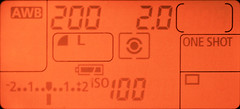 With evaluative metering and one-shot AF the camera will lock the exposure reading at the same time as the AF locks. You can prove this yourself, put your camera in one-shot AF and evaluative metering pattern. Then half press the shutter and once the focus is found keep your finger on the shutter and recompose your scene with a significant change of brightness, point the camera skyward for example. You should see that the shutter speed and aperture don’t change. To prove this we set up a test scene and pointed the centre AF point at the 7 in 70-200 on the lens and took a picture, then we repeated the shot and once focus lock was acheived moved the camera to put the centre AF point over the black strap on the edge of the camera. Surprise - or not - both shots have the same exposure settings.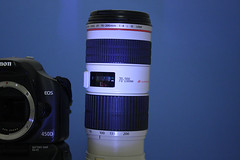
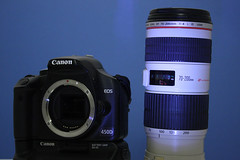
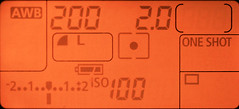
Both shots, 1/30s at f/5.6 - autofocus lock while framing with the 70 on lens at the centre AF point, exposure locks with the focus.
 If you are using Spot, Partial or Center-weighted metering, then the camera doesn’t lock the exposure until the shutter is pressed to take the picture. This means if you use focus lock and recompose then once the AF is complete and locked the metering isn’t. If your recomposed shot is significantly different in brightness then you will have the exposure for the recomposed scene not the focus locked scene. This can be a significant difference with spot or partial metering. Imagine you thought you took a spot meter reading from a persons face, focussed and locked the focus on the eyes then recomposed to put the person off centre for composition, except the person is in front of a black background. You just got over exposed skin tones in your picture.
Back to the test scene and partial metering, though spot, partial and center-weighted all exhibit the same behaviour.
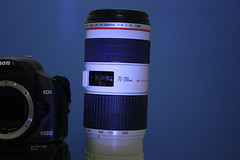
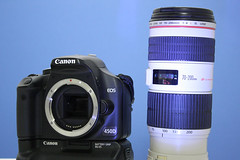
left image: focus lock on the lens, exposure 1/40s at f/5.6
right image: focus lock on the lens, recompose on the strap, exposure 1/13s at f/5.6
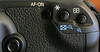 So how to overcome this? The answer is right under your thumb actually, the button marked with the * symbol is the exposure lock. You may need to make use of this when you use Spot, Partial or Center-weighted metering.
Got an EOS-1D series camera? On these models you can choose to have the spot meter reading point linked to the active AF point. If you use this AF point linked spot metering with automatic AF point selection then you may have less problems since the spot meter is most likely on the main subject of your pictures.
This post all applies to one-shot AF, if you use AI servo AF then there’s no automatic focus lock in any metering mode. Also in Manual exposure mode there's also no exposure lock at any time. Check the function availability table towards the back of your camera instruction book.
In another article we’ll cover custom functions for ‘back button focus’ which also has a bearing on when and how the AF and AE settings are locked; don’t you just love interdependencies.
So how to overcome this? The answer is right under your thumb actually, the button marked with the * symbol is the exposure lock. You may need to make use of this when you use Spot, Partial or Center-weighted metering.Got an EOS-1D series camera? On these models you can choose to have the spot meter reading point linked to the active AF point. If you use this AF point linked spot metering with automatic AF point selection then you may have less problems since the spot meter is most likely on the main subject of your pictures.
This post all applies to one-shot AF, if you use AI servo AF then there’s no automatic focus lock in any metering mode. Also in Manual exposure mode there's also no exposure lock at any time. Check the function availability table towards the back of your camera instruction book.
In another article we’ll cover custom functions for ‘back button focus’ which also has a bearing on when and how the AF and AE settings are locked; don’t you just love interdependencies.
If you follow our twitter feed you may be expecting flash posts, this is laying the ground for those.
-blabpictures-
-blabpictures-
Subscribe to:
Posts (Atom)


